


All Blogs » 10 Best Practices for Salesforce AMS Implementation Success
10 Best Practices for Salesforce AMS Implementation Success
Every year, hundreds of associations begin a Salesforce AMS implementation with high hopes and aggressive timelines. Within months, many find themselves behind schedule, over budget, and wondering what went wrong. The Element AMS team has nearly 25 years of experience guiding associations through these projects. Patterns have emerged that separate successful implementations from troubled ones.
This guide captures those patterns as practical best practices. Each section includes real examples, specific metrics, and actionable checklists drawn from actual association projects. Whether your organization has 2,000 members or 200,000, these principles apply.
Best Practice 1: Set Realistic AMS Implementation Timelines
The first mistake most associations make happens before they sign a contract. They accept timeline estimates that sound good but ignore organizational realities.
A realistic Salesforce AMS implementation timeline depends on organization size, but the reasons may surprise you. Technology moves fast. People do not.
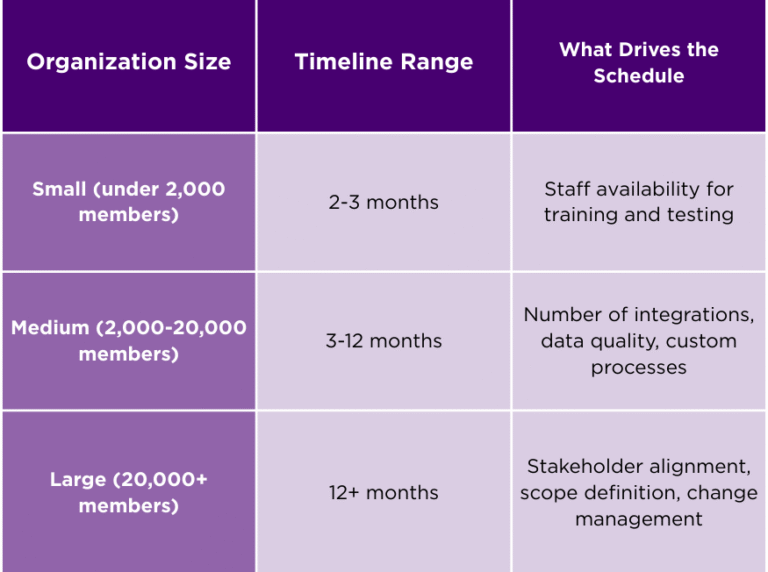
“The time typically is not for the process. It is actually the individuals involved,” notes Vishal Shah, CEO of Element AMS.
Your membership director has a day job. Your IT manager has other projects. Your finance team has month-end close. These same people must now attend implementation meetings, review configurations, test workflows, and approve designs. When they cannot carve out sufficient time, delays follow. This is not failure. This is reality.
Checklist for Realistic Timeline Planning

Before committing to any AMS implementation timeline, verify these items:
- Staff members assigned to the project have protected time on their calendars
- Leadership has communicated that this project takes priority
- Key decision-makers have reviewed the meeting schedule and confirmed availability
- Vacation schedules and busy seasons have been mapped against project milestones
- A contingency buffer of 20-30% has been added to all estimates
Best Practice 2: Plan Your AMS Data Migration as a Separate Workstream
Many associations treat AMS data migration as a checkbox item. Move data from system A to system B. How hard can it be?
A straightforward data transfer, with clean data and no transformation rules, takes about three weeks. That almost never happens. The complexity hides in places you do not expect.
Accounts and contacts present the biggest challenge. This data has accumulated over years, sometimes decades. Fields that once meant one thing now mean another. Duplicate records exist because staff worked around system limitations. Custom fields contain data that nobody remembers creating.
The Transaction Data Decision
One organization faced a choice during their Salesforce AMS implementation. They could migrate only open transactions, keeping their data clean and their timeline short. Or they could bring four years of history, giving members visibility into their past purchases but adding weeks to the project.
They chose history. The extra work paid off when members logged in and saw their complete order records. No phone calls asking for receipts. No support tickets requesting transaction history. The AMS data migration took longer, but the member experience improved.
Questions to Answer Before Data Migration Begins
- How many years of transaction history do members need to see?
- What dependent data comes with those transactions (products, discounts, payment methods)?
- Which fields in your current system have clean data versus fields that became catch-all containers?
- Do you have a data dictionary that explains what each field means today, not what it meant when created?
- Who will make decisions when transformation rules are unclear?
Membership engagement is an ongoing effort, but with the right strategies and a strong AMS, it can become a natural part of your organization’s workflow. By using your AMS to personalize communication, automate member journeys, manage events, gain data insights, and foster community, you can keep members connected and active.
Best Practice 3: Uncover Hidden Requirements Before Building
A requirement that fits in one sentence can take months to implement correctly. The difference between success and failure often lies in asking the right follow-up questions.
One association requested credit card payment processing. Simple enough. The project team moved on to the next item on the list.
Weeks later, problems surfaced. The organization had members in Europe where regulations require multi-factor authentication for online payments. A separate department processed telephone orders through a lockbox, entering card numbers without the security codes present on physical cards. Error messages needed to display in terms members would understand, not technical codes from the payment processor.
That single requirement, “accept credit card payments,” expanded into a month of additional work. The timeline slipped. The budget strained. All because nobody asked follow-up questions at the start.
The Hidden Requirements Checklist
For every requirement in your Salesforce AMS implementation, ask these questions:
- What happens when this process fails? How should errors display?
- Does this requirement apply differently for different member types?
- Are there international considerations (currency, compliance, language)?
- Does this requirement interact with other systems or processes?
- What exceptions exist, and how often do they occur?
- Who handles edge cases today, and what workarounds do they use?
The same pattern appears with membership types. A request for calendar-based membership sounds simple. But questions multiply quickly. Do you offer a free trial period before the paid term? Is that trial period truly free or a discounted rate? How long is the grace period after expiration? Can staff extend grace periods for individual members? Each answer shapes the configuration.
Best Practice 4: Resist the Urge to Clone Your Old Association Management System
When staff have used the same system for years, they develop muscle memory. Click here, then here, then here. Done. They can process transactions with their eyes closed.
The natural instinct during implementation is to replicate that experience exactly. Make the new system work just like the old one. This instinct leads to some of the most expensive mistakes in association management system projects.
“You are spending all the energy to reinventing the wheel at the technology stack level, just to clone the process. That is a big debt that the organization creates,” says Shah.
Every technology platform has strengths. Your old system was designed with certain assumptions about how work should flow. Salesforce was designed with different assumptions. When you force Salesforce to behave like your old system, you fight the platform instead of using it.
Better Approach: Process Adaptation
Ask these questions for each major workflow:
- Why did we build this process the way we did in the old system?
- What limitations in the old system shaped this workflow?
- Does our new platform handle this scenario differently?
- If we were starting fresh today, how would we design this?
The organizations that gain the most from their Salesforce AMS implementation are those willing to adapt their processes. The ones that struggle are those who demand exact replication of every click.
Best Practice 5: Accept That Duplicate Data Will Happen
After years of implementations, one truth stands out: duplicate data cannot be avoided. It can only be managed.
Consider how contact data enters your association management system:
- Integration partners send records through automated feeds
- Staff members create contacts during phone calls
- Members register themselves through web forms
- The same person provides different email addresses at different times
- Privacy features on phones generate masked email addresses automatically
One membership professional encountered a puzzling case. A member appeared in the system three times with three different emails. Investigation revealed the story. The member used their work email for the annual conference. They used their personal email when buying a publication. When signing up for a webinar on their phone, Apple’s privacy feature generated a random email address that hid their real identity.
No matching rule would catch all three records. The names matched, but the emails did not. The addresses were different because the member had moved. Only a human reviewing the data could connect them.
Practical Duplicate Management
About 20-30% of duplicates can be caught with automated rules:
- Email address exact match
- First initial plus last name plus address match
- Phone number match with fuzzy name matching
The remaining duplicates require a monitoring system. Allow records to be created, then run weekly reports to identify potential matches. Assign staff time to review and merge. Build this into ongoing operations, not just implementation
Best Practice 6: Use Salesforce Governor Limits as Design Guides
Most organizations view platform limitations as obstacles. After years of working within Salesforce, a different perspective has emerged: Salesforce governor limits make solutions better.
Research on creativity found something counterintuitive. When designers received a blank page with no constraints, their work suffered. When given a defined box with clear boundaries, creativity flourished. Constraints focus attention and force innovative thinking.
“You really get to creatively design a process within this box. That is why I love it,” adds Shah.
Salesforce governor limits define that box. They exist because Salesforce runs on shared infrastructure. Every organization gets fair access to resources. No single customer can monopolize the system.
The Member Directory Example
One organization wanted a member directory that would let visitors browse all two million contacts. They wanted infinite scrolling through every record in the database.
Salesforce limits query results to 100,000 records. The initial reaction was frustration. How would members find who they were looking for?
The answer came from observing how people actually search. Nobody scrolls through two million records. Nobody goes to page 50 of search results. People refine their search until they get a manageable list of relevant results.
The redesigned directory encouraged filtering. Search by region. Search by specialty. Search by certification. Each filter narrowed the results to something useful. Members found who they needed faster than they would have with infinite scrolling. The limitation forced better design.
Best Practice 7: Build Your Technology Support Ecosystem Early
A pattern plays out in families across the country. Parents receive new smartphones. They figure out most features on their own. Then an update changes the interface. A button moves. A setting disappears. They call their children for help.
Everyone reaches a point where technology outpaces their ability to keep up. Association staff are no different.
Salesforce releases updates constantly. Three major releases per year plus continuous smaller changes. Features move. Interfaces evolve. If staying current with technology is not someone’s primary job, they will fall behind.
Signs You Need Technology Support
Watch for these indicators that your team needs help:
- Staff avoid certain features because they do not understand them
- Workarounds have developed that bypass standard processes
- Questions submitted to vendors take days to resolve
- New feature announcements go unread because nobody has time
- Simple configuration changes require external consultants
The question every organization should answer: at work, who is your family? If you do not have internal Salesforce expertise, who provides external support? Your association management system vendor knows the AMS product. They may not know every Salesforce feature. Having a Salesforce partner or certified administrator on call protects your investment.
Best Practice 8: Measure Success at the First Renewal Cycle
A Salesforce AMS implementation does not end at go-live. The true test comes later, when the system faces real operational stress.
Renewal season exposes every assumption made during implementation. Did the AMS data migration bring records in the right structure? Do invoices calculate correctly for every membership type? Do integrations send the right flags to other systems? Do members receive the right communications at the right times?
One association running their first auto-renewal on a new system achieved 80% success on the initial run. Eight out of ten members renewed without intervention. That sounds good until you calculate the work required for the remaining 20%. For an organization with 10,000 members, that means 2,000 cases requiring staff attention.
The organizations that prepare for this reality allocate extra staff time during the first renewal cycle. They expect issues. They build response plans. They treat the first renewal as an extended testing phase, not a finished product.
Best Practice 9: Budget for Total Cost, Not Just Software
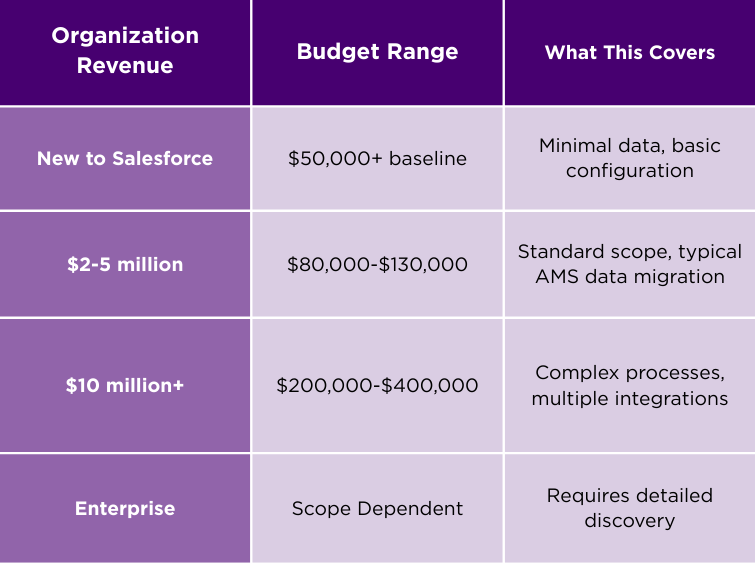
Realistic budget expectations for a Salesforce AMS implementation vary by organization size. These ranges reflect actual project costs, not vendor optimism.
Anyone quoting $20,000 or $30,000 for a complete Salesforce AMS implementation has not thought through the work required.
Hidden Costs Checklist
Beyond implementation, budget for these items:
- Every integrated vendor needs re-linking work when system identifiers change
- Vendors may charge for sandbox environments to test new connections
- Staff training beyond initial go-live sessions
- Temporary productivity loss during learning curve
- Data cleanup projects that surface during migration
- Post-go-live support hours for unexpected issues
Contact every vendor that receives data from your current system before finalizing your budget. Ask what their migration process involves and what it costs. These conversations surface expenses that otherwise appear as surprises.
Best Practice 10: Match Platform Choice to Organization Scale
Choosing a Salesforce-based association management system resembles choosing between smartphone platforms. Both iOS and Android work well. Preference often determines the choice.
However, certain factors push toward platform solutions like Salesforce:
- Organizations with 20,000+ members need infrastructure that scales
- Associations with complex integration requirements benefit from Salesforce’s ecosystem
- Teams that want to extend and customize their system find more options on a platform
- Organizations planning long-term technology investment want a vendor with substantial R&D resources
Standalone vendors dedicate their development teams to their products. Salesforce invests billions in platform infrastructure. That difference matters when reliability and scalability drive requirements.
Budget constraints are real. Platform solutions typically cost more because they offer more options. Smaller organizations with straightforward needs may find better value elsewhere.
Moving Forward with Confidence
After 25 years of Salesforce AMS implementation projects, patterns of success are clear. Organizations that succeed prepare for complexity instead of being surprised by it. They adapt processes to their new platform instead of forcing replication. They invest in ongoing support instead of assuming self-sufficiency. They measure success at the first renewal cycle, not the go-live date.
The goal is not a perfect implementation. The goal is enabling staff to feel proud of what they accomplish with their system. When an administrator lists three system enhancements on their annual performance review as personal achievements, something important has happened. Technology stopped being an obstacle and became an enabler.
Your Salesforce AMS implementation can achieve the same outcome. Start with realistic expectations. Follow these best practices. Build the support ecosystem your team needs. The organizations that do this consistently reach their goals.
Want to see if Element AMS is the right AMS
to help you engage your membership?

Sassly is a real early-stage software looking for an analytics platform that scales with you, check out our stage program.