


All Blogs » Do membership systems support recurring billing and one‑click payments?
Do membership systems support recurring billing and one‑click payments?

The financial health of your association depends on predictable, timely revenue. Manual invoicing and one‑off payments waste staff time and create friction for members. Modern association management systems (AMS) — especially CRM‑backed AMS platforms like Element AMS on Salesforce — include automated recurring billing and one‑click payments as standard features. When implemented correctly they reduce administrative load, stabilize cash flow, and increase non‑dues revenue by streamlining the payment experience and keeping all of your data in your source of truth.
What are the core payment features?
- Recurring billing: Automatically charges members on a schedule (anniversary, calendar date, quarterly, etc.), handles proration, and issues receipts.
- One‑click payments: Reuses a stored payment method to complete purchases (events, merchandise, donations) with a single click, reducing cart abandonment.
- Secure gateway integration: Uses PCI‑compliant payment processors (Stripe, Authorize.Net, etc.) so card data is vaulted by the gateway, not stored in your AMS.
- Dunning & retries: Automated retry rules and email workflows for failed charges.
- Reporting & reconciliation: Built‑in reports for renewals, failed payments, revenue by source, and aging, plus integration to accounting systems.

Business Benefits
- Higher retention: Automatic renewals reduce involuntary lapses.
- Less staff time: Automate invoicing, receipts, reminders, and reconciliation.
- Predictable cash flow: Forecast revenue with greater accuracy.
- More non‑dues revenue: Faster checkout increases event, store, and donation conversions.
- Better member experience: Members appreciate self‑service, instant receipts, and fewer billing headaches.
How recurring billing works (practical steps)
- Define membership tiers and billing cycles (annual, semi‑annual, quarterly).
- Configure proration and grace/late‑fee rules.
- Integrate a PCI‑compliant gateway (e.g., Stripe, Authorize.Net). Enter API keys in your AMS settings.
- Create automated renewal communications (reminder → invoice → final notice).
- Onboard members: capture payment methods via secure portal or mass onboarding links.
- Monitor and tune: track retry success rates, failed payments, and lifecycle metrics.
How one‑click payments work (in practice)
- Member stores a payment method securely (gateway vault).
- At checkout (event, store, donation), the AMS presents the saved method and shows masked card digits.
- Member confirms payment with one click. Transaction posts instantly and triggers receipt and any follow‑up workflows.
Do you have complex requirements?
We recommend using Salesforce Flows for complex logic. Keep each flow small and testable.
Discuss options with the Element team today.
Best Practices
Setup
- Start with a clear membership model: list tiers, renewal dates, and proration rules in a spreadsheet.
- Use a trusted payment gateway and enable tokenization/PCI vaulting.
- Test workflows end‑to‑end with test cards and real‑world scenarios (new member, lapsed member, corporate billing).
- Configure dunning with incremental retry timing and escalating notices.
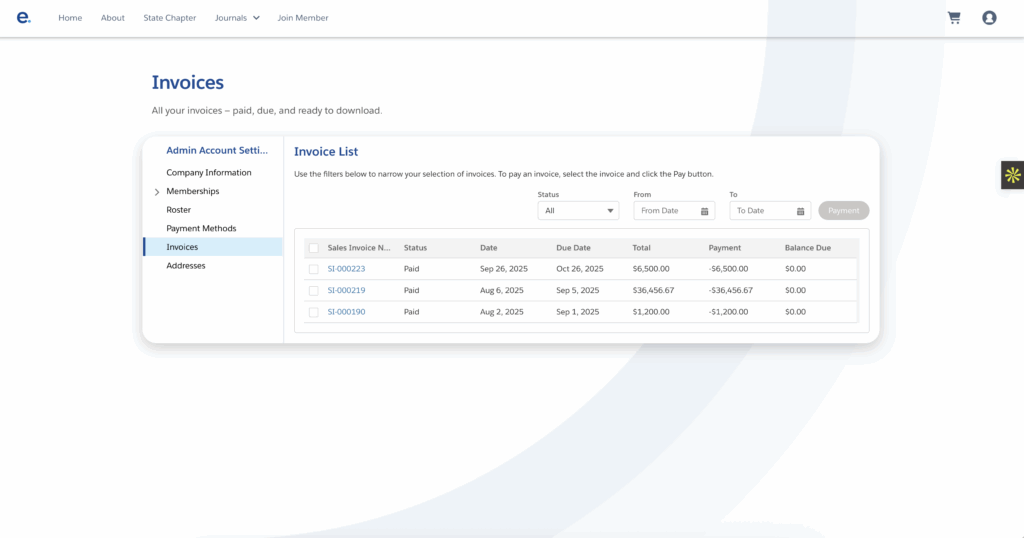
- Ensure member portals show clear invoice history and a simple path to update payment methods.
- Integrate with accounting (QuickBooks, Sage Intacct) for automatic posting and reconciliation.
Security and Compliance
- Use PCI‑DSS‑compliant gateways; do not store raw card data in your AMS.
- Ensure TLS/HTTPS for all payment pages and portals.
- Maintain audit logs for all transactions and changes.
- Provide members easy access to payment history and the ability to update methods via a secure portal.
Common Questions
- Are payment methods stored securely? Yes — payment processors vault card data; your AMS stores tokens, not raw numbers.
- Who controls the saved payment method? Members can view, update, and remove payment methods from their portal.
- What happens on failed payments? Configure automated retries, email sequences, and staff alerts for manual follow‑up.
- Can the system handle complex billing (proration, corporate tiers)? Yes — choose an AMS that supports company‑level dues and advanced billing rules.
Reporting you should track
- Renewal success rate (automated vs. manual)
- Failed payment rate and retry success rate
- Revenue by source (dues vs. events vs. store vs. donations)
- Aging and outstanding invoices
- Average time to reconcile vs. prior process
Example combined workflow (real world)
- Jan 15: Member renewal charges automatically via recurring billing; membership status updates.
- Mar 1: Conference announced; member clicks register.
- Checkout: One‑click payment uses saved card; confirmation and receipt delivered instantly.
- Post‑event: Event revenue and attendance feed into reports that correlate attendance with renewal rates.
Local Micro-Campaigns
- Use geo segments (e.g., DC, Texas, Chicago) for small events and track conversion.
Choosing the right AMS for payments
Measurement and Iteration Cadence
Are you responsible for monitoring and reporting on a set of KPIs? An established measurement and iteration cadence outlines how you monitor KPIs, act on signals, and continuously improve plays. As a result, you can produce a one‑page monthly summary for stakeholders and a deeper quarterly board review that captures outcomes, hypotheses, and decisions each quarter to close the learning loop and iterate faster. Here is our recommendation for a cadence:
- Weekly: Quick chapter health snapshot, new members, renewal flags.
- Monthly: Segment churn and automation success.
- Quarterly: Schema review, merge low-volume classes, update naming.
- A/B test messages per segment and measure open→click→conversion lifts.
Let's discuss segmentation options for your org.
Book a demo with Element AMS — no obligation, just tailored functionality, and clear next steps.
Whats next?
Automating recurring billing and enabling one‑click payments is a high‑ROI step for associations: it improves retention, reduces manual work, and grows non‑dues revenue. For associations that need both reliable operations and rich relationship data, a CRM‑backed AMS (like Element AMS on Salesforce) keeps transactional and interaction data together so you can act on accurate financial and engagement insights.
See it in action
<

Sassly is a real early-stage software looking for an analytics platform that scales with you, check out our stage program.