


Element AMS

Finding the Best Membership and Association Management Software for Your Organization

Your members are at the core of your work, but paperwork and scattered systems steal your time. The right membership or association management system turns manual tasks into reliable processes, surfaces actionable member insights, and frees staff to focus on strategy and growth. This guide helps you choose software that improves retention, cuts busywork, and delivers clearer reporting.

What is membership management software? Membership management software centralizes member data and automates routine tasks like joining, renewals, and payments. It replaces spreadsheets and paper forms with a secure, searchable database and member self‑service.

Common Membership Features

  • Member database and profiles
  • Online join and renewal forms
  • Payment processing and recurring billing
  • Basic reporting and dashboards


What is an Association Management System (AMS)?

An AMS includes the core membership features above, plus advanced tools for larger or more complex organizations. Think of an AMS as the organization’s operational hub — it connects national offices, local chapters, volunteers, events, advanced marketing functionality, and finances.

A man focused on work with data graphics as design elements on the image.

Typical AMS Capabilities

  • Chapter/component management and delegated admin access
  • Advanced event management (sessions, CE tracking, exhibitors/sponsors)
  • Committee/volunteer management and document libraries
  • Detailed financial reporting and accounting integrations
  • Learning Management System (LMS) integrations and certification tracking


Key outcomes You Can Act On – delivered by quality software

  1. Increase member retention
  • Identify at‑risk members via activity and engagement data.
  • Automate renewal reminders and simplify payments to reduce lapses.

2. Improve operational efficiency

  • Eliminate manual data entry and reconcile corporate rosters automatically.
  • Free staff to focus on outreach and programming.

3. Gain actionable insights

  • Use dashboards and custom reports to measure acquisition, retention, and program performance.

4. Empower teams and chapters

  • Give chapter admins secure access to run local events, member lists, and reports.
A Simple Framework for Choosing Your System

Step 1 — Document core needs

  • Map your workflows: onboarding, renewals, events, reporting, volunteer coordination.
  • Ask: Which tasks cost the most staff time? Where are the reporting gaps?


Step 2 — Map features to benefits Feature → Practical benefit

  • Configurable join forms → Capture right data at signup
  • Automated renewal campaigns → Fewer lapses, less follow‑up work
  • Integrated payment gateway → Secure payments and automatic reconciliation
  • Member self‑service portal → Fewer support requests
  • Custom report builder → Fast answers for the board
  • Event management → Single place for registration, badges, CEUs


Step 3 — Plan for implementation & adoption

  • Expect a phased rollout: discovery, configuration, data migration, training, and go‑live.
  • Confirm vendor support: project plan, milestones, training, and post‑launch care.

Step 4 — Evaluate the partner, not just the product

  • Look for ongoing product updates, strong support SLAs, and references. The vendor relationship matters for long‑term success.
Element AMS: designed for association outcomes 

Element AMS is a CRM‑backed AMS built for modern associations. We focus on outcomes that matter: retention, efficiency, data clarity, and growth.

How Element AMS helps:

  • Streamline chapter management: delegate secure access so chapter admins manage local members and events.
  • Automate the member journey: from application through renewal with configurable workflows and notifications.
  • Confident reporting: custom reports on membership, event revenue, and engagement.
  • Optimize learning & events: run registration, CE tracking, sponsorships, and exhibitor workflows in one platform.


Implementation Phases — What to Expect

  • Discovery & planning: align goals, processes, and timeline.
  • Configuration & build: set up memberships, events, and reports.
  • Data migration: clean, map, and import legacy data with vendor support.
  • Training & testing: role‑based training and end‑to‑end testing.
  • Go‑live & support: on‑demand support and post‑launch follow‑up.
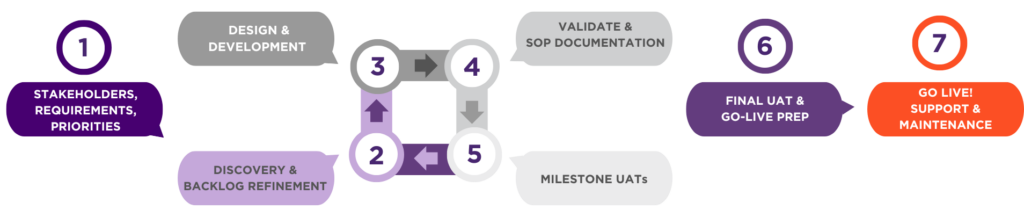
This image shows a high level process of how the Element AMS product is implemented.

Build Your Business Case
  • Calculate time savings: hours spent on manual renewals, reporting, and member requests.
  • Identify revenue opportunities: reduced lapses, increased sponsorships, and new online courses.
  • Show the cost of inaction: staff burnout, member churn, and missed opportunities.
 
Real‑world Scenarios
  • Chapter admin burden → chapter portal with delegated admin reduces national office workload.
  • Fragmented event systems → single AMS for registration, payments, sessions, and CEUs.
  • Board asks for data → custom report builder produces answers quickly.
FAQ (short answers) 
  • AMS vs CRM? An AMS is a membership‑focused platform with transactions and billing; a CRM focuses on relationship data. A CRM‑backed AMS combines both.
  • Cost? Varies by size and features — ask for transparent pricing that includes implementation and support.
  • Implementation time? Weeks to months, depending on complexity.
  • Integrations? Ask about email platforms, accounting, LMS, and webinar tools.
 
Next steps

Choosing the right system starts with understanding your needs. If you want to see an AMS built for associations, book a 20‑minute walkthrough of Element AMS to see how it can solve your specific challenges.


Take the Fit Quiz to see if Element AMS
is the best AMS for your organization:

Previous Blog
Next Blog

Sassly is a real early-stage software looking for an analytics platform that scales with you, check out our stage program.